Your research paragraph →
verified academic references, instantly
Paste 2–4 sentences from your manuscript. The tool identifies the distinct scientific claims in your text and retrieves real, verified papers from OpenAlex and CrossRef for each one. No keyword guessing. No hallucinated citations.
Free daily credits. No credit card. Works on any research topic.
The Problem with Literature Searches
When you write a manuscript, you often know what you want to say before you know which papers to cite. The standard workflow — write a claim, then search Google Scholar for supporting papers — forces you to translate your sentence into keywords, browse results, evaluate abstracts, and decide which papers actually match your specific statement. For a 20-page article with 40 claims, this is hours of work.
The alternative — asking an AI chatbot to suggest references — is faster but carries a well-documented risk: large language models frequently fabricate citations. The paper title looks plausible, the author names sound real, the journal is credible — but the DOI leads nowhere, or the paper says the opposite of what you claimed. Researchers who rely on LLM-generated references without verification have faced retractions and editorial corrections.
AiCitationChecker's Find References tool takes a third path: it uses AI to understand the meaning of your paragraph and extract search queries, then retrieves papers exclusively from OpenAlex and CrossRef — two open, authoritative academic databases. Every result has a verified DOI and comes from a real publication. The AI reads your text; the references are real.
800
max characters per search
4
claims analysed per paragraph (Deep)
60+
candidate papers retrieved per search
1. Paste Your Research Paragraph
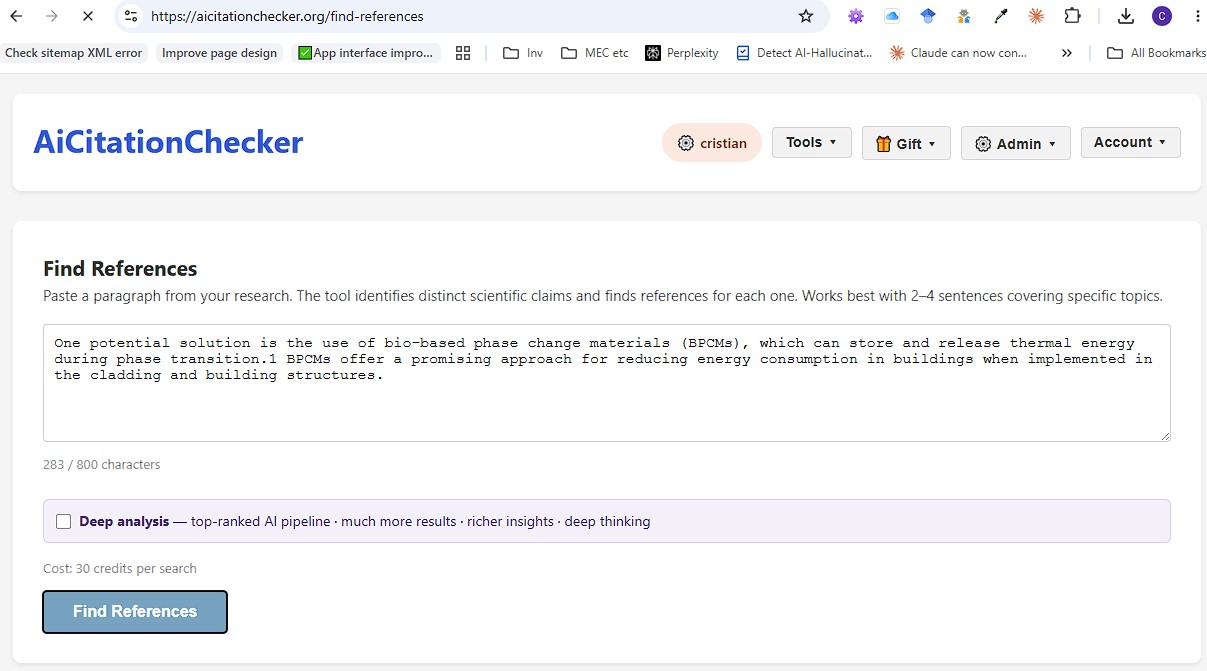
Paste up to 800 characters of your draft — typically 2–4 sentences covering one or more specific scientific claims. Choose Standard mode (30 credits) for a fast, focused search on a single claim, or Deep Analysis (115 credits) to extract multiple claims and search for each one independently. The character counter is shown before you submit.
2. Review Inline Citations and Reference Cards
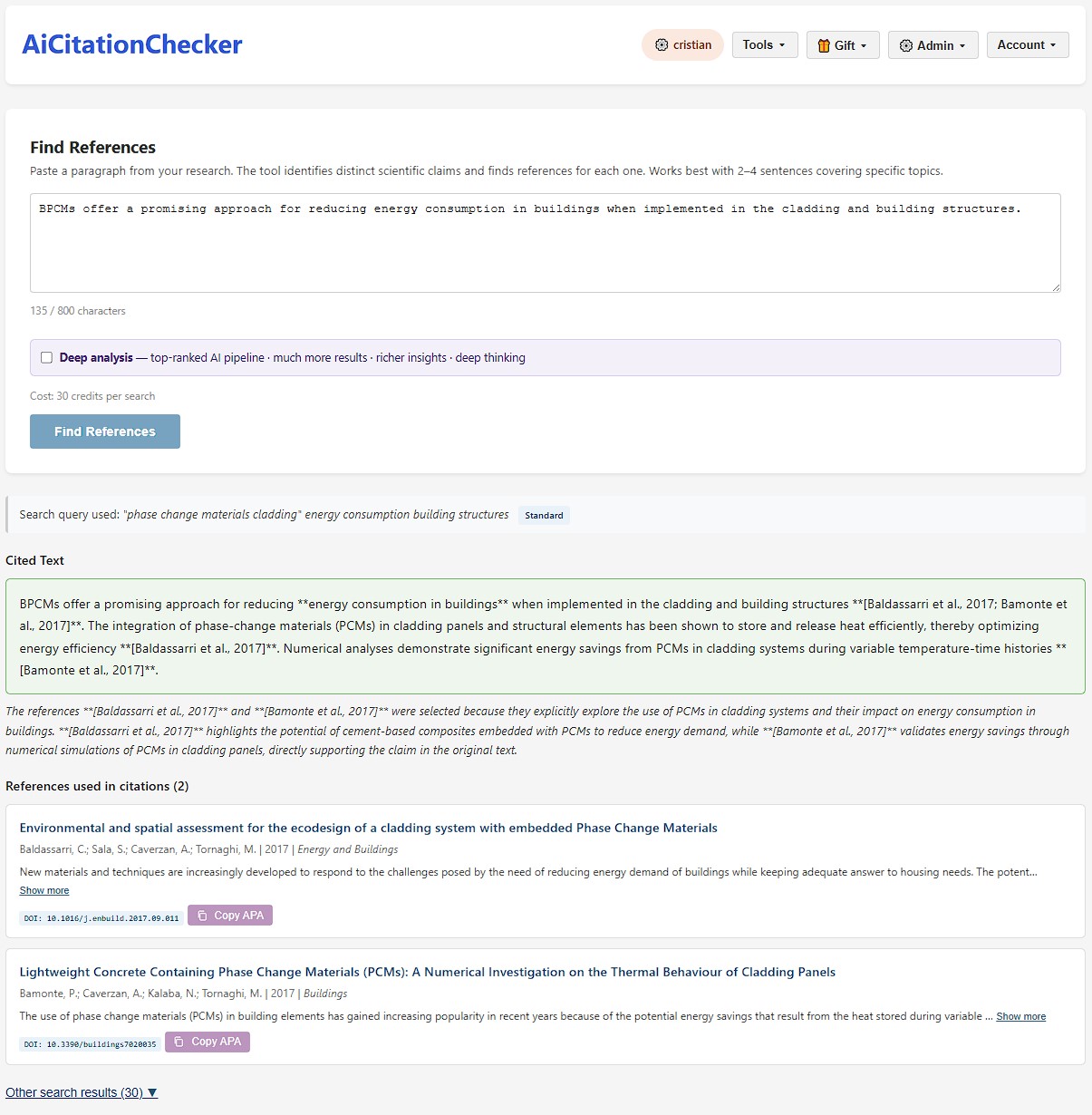
Results appear as two layers: a Cited Text block shows your paragraph with inline citations inserted at the exact positions where the matched papers support your claims, followed by an explanation of why each paper was selected. Below that, reference cards display each paper's title, authors, journal, year, abstract excerpt, DOI, and a one-click APA citation copy button. Additional candidate papers are listed in a collapsible "Other search results" section.
3. Deep Analysis — More Claims, More Papers
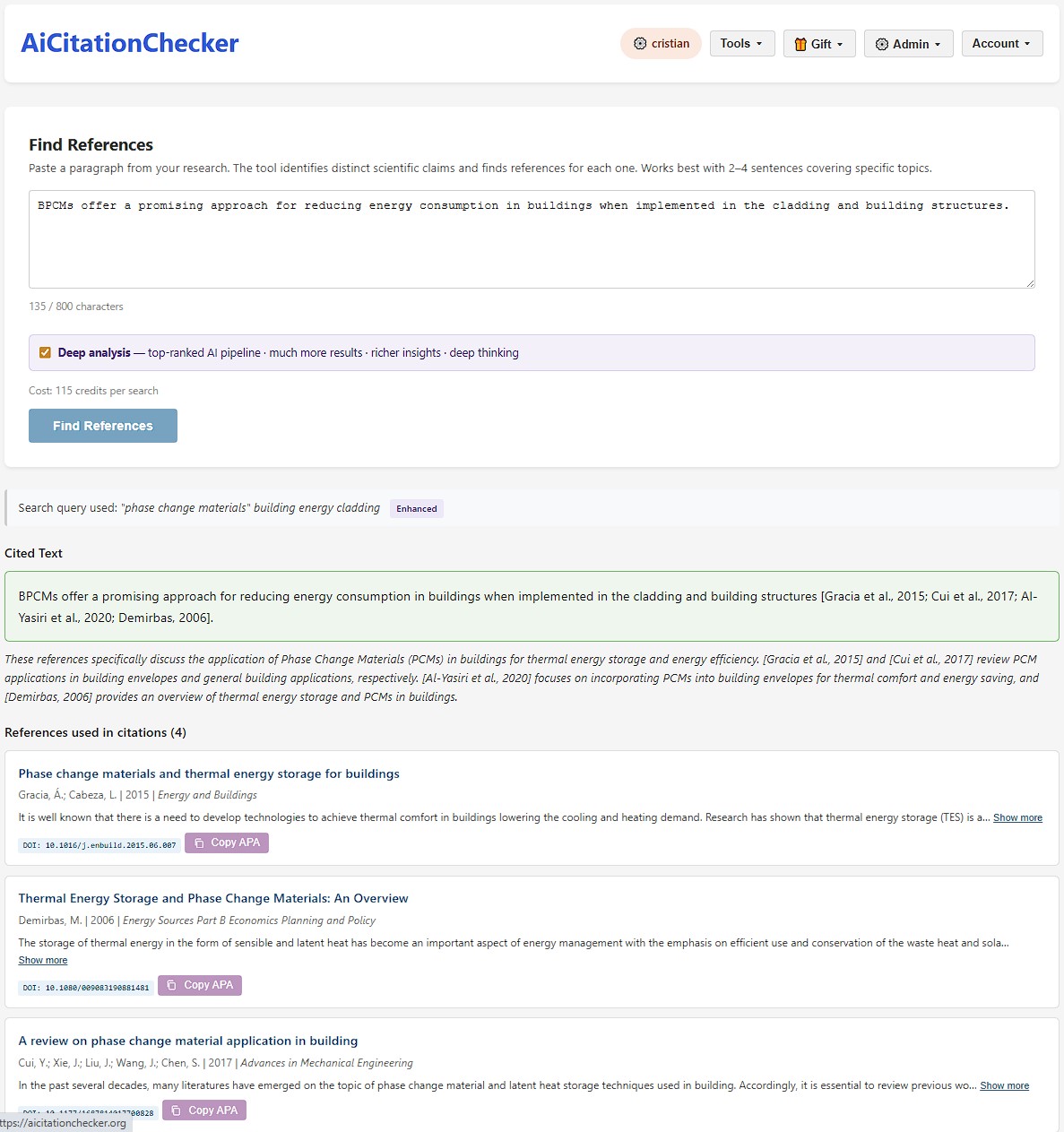
In Deep Analysis mode, the tool decomposes your paragraph into up to 4 distinct scientific claims and searches independently for each one. The result is a larger, more diverse pool of references — covering more angles of your paragraph. The Cited Text block reflects all assigned citations; each reference card is labelled with the specific claim it supports.
A Real Example: Phase Change Materials in Buildings
The screenshot above uses this input sentence from a published 2024 paper in Energy Storage (Grzybek et al., doi:10.1002/est2.568):
"BPCMs offer a promising approach for reducing energy consumption in buildings when implemented in the cladding and building structures."
Standard mode identified one claim and assigned 2 inline citations:
- Baldassarri et al. (2017) — "Environmental and spatial assessment for the ecodesign of a cladding system with embedded Phase Change Materials" — Energy and Buildings, doi:10.1016/j.enbuild.2017.09.011
- Bamonte et al. (2017) — "Lightweight Concrete Containing Phase Change Materials (PCMs): A Numerical Investigation on the Thermal Behaviour of Cladding Panels" — Buildings, doi:10.3390/buildings7020035
Deep Analysis ran 3 parallel searches and assigned 4 citations, adding:
- Gracia & Cabeza (2015) — "Phase change materials and thermal energy storage for buildings" — Energy and Buildings, doi:10.1016/j.enbuild.2015.06.007
- Demirbas (2006) — "Thermal Energy Storage and Phase Change Materials: An Overview" — Energy Sources Part B, doi:10.1080/009083190881481
All four papers are real, have verified DOIs, and directly support the claim. No hallucinated citations.
Standard vs Deep Analysis — Which to Use?
Standard — 30 credits
Best for a single, focused claim. The AI extracts one search query from your paragraph and retrieves the most relevant papers from OpenAlex and CrossRef.
- Fast (seconds)
- 1 search query
- 32 candidate papers
- Inline citations for the best matches
Deep Analysis — 115 credits
Best for complex paragraphs with multiple claims, or when you need a thorough literature sweep. The AI identifies up to 4 distinct claims and searches for each.
- Thorough (10–20 seconds)
- Up to 4 parallel searches
- 64 candidate papers per search
- Richer inline citation coverage
Who Uses Find References
Authors drafting manuscripts
Write your argument first, then find the papers to back it up. Paste each key paragraph and let the tool retrieve candidate references — no keyword brainstorming required.
Literature review writers
Use your own hypothesis or summary sentence as the search input. Discover papers you would not have found through standard keyword searches — especially useful in interdisciplinary topics.
Peer reviewers and editors
Paste an author's unreferenced paragraph to quickly identify the foundational papers they should have cited — or to verify that their claims are actually supported by the literature they listed.
Free to Start. Pay Per Search, Not Per Month.
Standard search: 30.0 credits. Deep Analysis: 115.0 credits. Free daily credits are refreshed every day — enough to run several standard searches at no cost.
Credits do not expire with a subscription — buy once, use when you need them.
Free — $0
Daily credit allowance, refreshed every day. No credit card, no subscription. Run several standard searches per day at no cost.
Silver Pack
One-time credit purchase — no auto-renewal. Covers dozens of standard searches or a sustained Deep Analysis session. See current price at checkout.
Gold Pack
Higher credit volume for sustained use: a research group, a systematic review, or a high-output author. See current price at checkout.
Frequently Asked Questions
What kind of text works best?
2–4 sentences describing specific, testable scientific claims. The tool reads the semantic meaning of your paragraph — not keywords — so precise, factual statements yield the most targeted results. Avoid very broad or introductory sentences that do not commit to a specific claim.
How is this different from a keyword search in Google Scholar?
A keyword search requires you to already know which terms describe your claim. The Find References tool reads the meaning of your paragraph, extracts distinct scientific claims, and queries academic databases on your behalf — without you choosing the search terms. It also assigns inline citations directly to your text.
Are the references guaranteed to be real papers?
Yes. All results come directly from OpenAlex and CrossRef — two of the largest open academic databases. Each result includes a verified DOI. The tool does not generate or invent citations; it only returns papers that exist in these databases.
How is this different from the Detect AI Citations tool?
The Detect AI Citations tool starts from an existing reference list and checks whether each cited paper is real and correctly described. The Find References tool starts from a paragraph of text with no citations and discovers which real papers support the claims it contains. One verifies; the other discovers.
Related Tools
Detect AI-Hallucinated Citations →
Already have a reference list? Verify that each cited paper is real and correctly described — cross-referenced against CrossRef and OpenAlex.
Citation–Reference Checker →
Cross-check every in-text citation against your reference list. Catches missing references, uncited entries, and numbering gaps in 20 seconds.
For Academics →
How peer reviewers, editors, and research groups use AiCitationChecker across the full publication workflow.
Paste a paragraph. Get verified references in seconds.
Free daily credits. No credit card. Works on any research topic.
Find References Now